
How to Audit Your Box Suite: A Five-Step Guide
Most warehouses chose their box sizes years ago. Somebody ordered a sensible-looking range from the corrugated supplier, the product catalogue changed, a few brands came and went, and the cartons on the shelf above the pack bench stayed exactly the same.
That is how you end up paying a carrier to move very expensive air. When DS Smith measured 190 e-commerce packs, it found that, on average, about 43% of each box was empty space (The Empty Space Economy, Forbes Insights in association with DS Smith, 2018). The same report found that only 36% of the executives surveyed had audited the empty space in their shipping.
A box suite audit is how you join that 36%. It doesn't need a consultant or a new machine. It needs your order history, honest SKU dimensions and a clear head about what the numbers are telling you. Here is the five-step method we use.
Why the Box Suite Matters More Than Any Single Box
Parcel carriers charge on the greater of actual weight and dimensional (volumetric) weight, which is the box's length × width × height divided by a divisor set in your rate agreement. The divisor varies by carrier, service and contract, so check your own. The principle doesn't change: for a light, bulky parcel, the bill follows the box, not the product.
That makes the box suite a pricing decision, not a stationery order. Every gap between two box sizes is a place where orders that are slightly too big for the smaller box are forced into a much bigger one. Packers aren't being careless when that happens. They are doing exactly what the suite allows.
There is a fair counter-argument, and it matters: more box sizes are not free. Each extra size takes up space at the pack station, adds a line to purchasing and gives packers one more choice to get wrong under quota pressure. The goal of an audit is not the largest box range. It is the smallest range that fits your real orders well.
The Five-Step Box Suite Audit
Step 1: Fix the SKU data before you trust any result
Every box calculation starts with product dimensions, and most catalogues contain a few that are wrong: a 1 kg tub logged at the size of its pallet case, a phone case recorded as 0 × 0 × 0, centimetres typed into an inches field. One bad SKU can make a whole order look as if it needs your largest carton. Before anything else, flag the dimensions that are missing, zero or physically implausible, and correct them. Our free SKU Health Check does this first pass in under a minute.
Step 2: Measure how your boxes are actually used
Pull the last 90 days of shipped orders with the box each one went in. For every box size, note:
- Share of orders: which sizes do the heavy lifting and which have barely moved.
- Fill rate: total item volume ÷ box volume, averaged across the orders in that box. The rest is air you pay to ship and then pay again to fill with void fill.
- Single- vs multi-item mix: single items usually have one obvious box. Multi-item orders are where the choice, and the waste, lives.
- Idle sizes: a carton nobody has used in months is shelf space, stock and cash doing nothing.
Step 3: Compare every order with its tightest fit
This is the easiest step to skip, and it is the one that finds the money. For each distinct order profile, work out the smallest box that would physically hold its items. For a single item, that is the item itself plus your clearance. For multi-item orders it is a genuine 3D packing problem (we explain why in The Science of Efficient Space Use), so a spreadsheet that simply adds item volumes together will understate the box you really need.
Then put the tightest fit next to the box that order actually shipped in. The size of that jump tells you where your suite has gaps.
Step 4: Separate the wrong box from the missing box
Oversized parcels come from two different problems, and they need different fixes:
- The wrong box was picked. A smaller box in your current suite would have fitted, but the packer reached for a bigger one. This is a floor problem: no new cartons will fix it.
- The right box doesn't exist. The tightest fit falls into a gap between two of your sizes, so even a perfect packer has to over-box. This is a suite problem: you fix it by adding or swapping a size.
Mixing the two up is an easy and expensive mistake. Buy new cartons to solve a floor problem and you get a bigger shelf with the same waste.
Step 5: Change the suite one size at a time
Start from the boxes you have. Test every single swap or additional size against your real orders and keep the change that saves the most shipped volume; then test the next. Stop when the next change saves too little to justify the extra space at the station. Retire the sizes Step 2 showed are idle. Only then consider a full redesign of the range.
Let's Do the Maths: One Missing Box
Take a simple four-box suite (all internal dimensions):
| Box | Size (cm) | Volume (cm³) |
|---|---|---|
| Small mailer | 25 × 18 × 6 | 2,700 |
| Medium mailer | 34 × 26 × 8 | 7,072 |
| Cube | 30 × 30 × 30 | 27,000 |
| Large box | 45 × 35 × 30 | 47,250 |
Now a three-item order with 6,500 cm³ of product whose tightest packed arrangement measures 35 × 26 × 10 cm (9,100 cm³). It is too long and too tall for the medium mailer, and 5 cm too long for the cube, so the only box it fits is the large one: 47,250 cm³, more than five times the space of its packed arrangement. Fill rate: 6,500 ÷ 47,250 = 13.8%.
Add one size to the suite, 36 × 28 × 12 cm (12,096 cm³), and the same order fits, with at least a centimetre to spare in every dimension:
- Shipped volume: 47,250 → 12,096 cm³, a fall of 35,154 cm³, or 74%.
- Fill rate: 13.8% → 6,500 ÷ 12,096 = 53.7%.
- Volumetric weight: whatever your divisor, it scales with box volume, so it also falls by about 74% (before your carrier's rounding). If the parcel was billed on volumetric weight, its billable weight falls by up to that much: less if the new box's volumetric weight drops below the parcel's actual weight.
One order proves nothing, of course. The question an audit answers is how many of your orders sit in that same gap. If it is a handful a month, the new box isn't worth its shelf space. If it is a steady share of your multi-item orders, it may be the best purchase you make this year.
The Half an Audit Can't Fix: Using the Right Box
A perfect suite still leaks money if packers can't see which box to use. Under speed pressure, people round up: a slightly bigger box feels safer than a second attempt. That is the "wrong box" problem from Step 4, and it is why we built TCS-i around the moment of packing, not just the shelf. (For the wider DIM picture, see How to Reduce DIM Charges.)
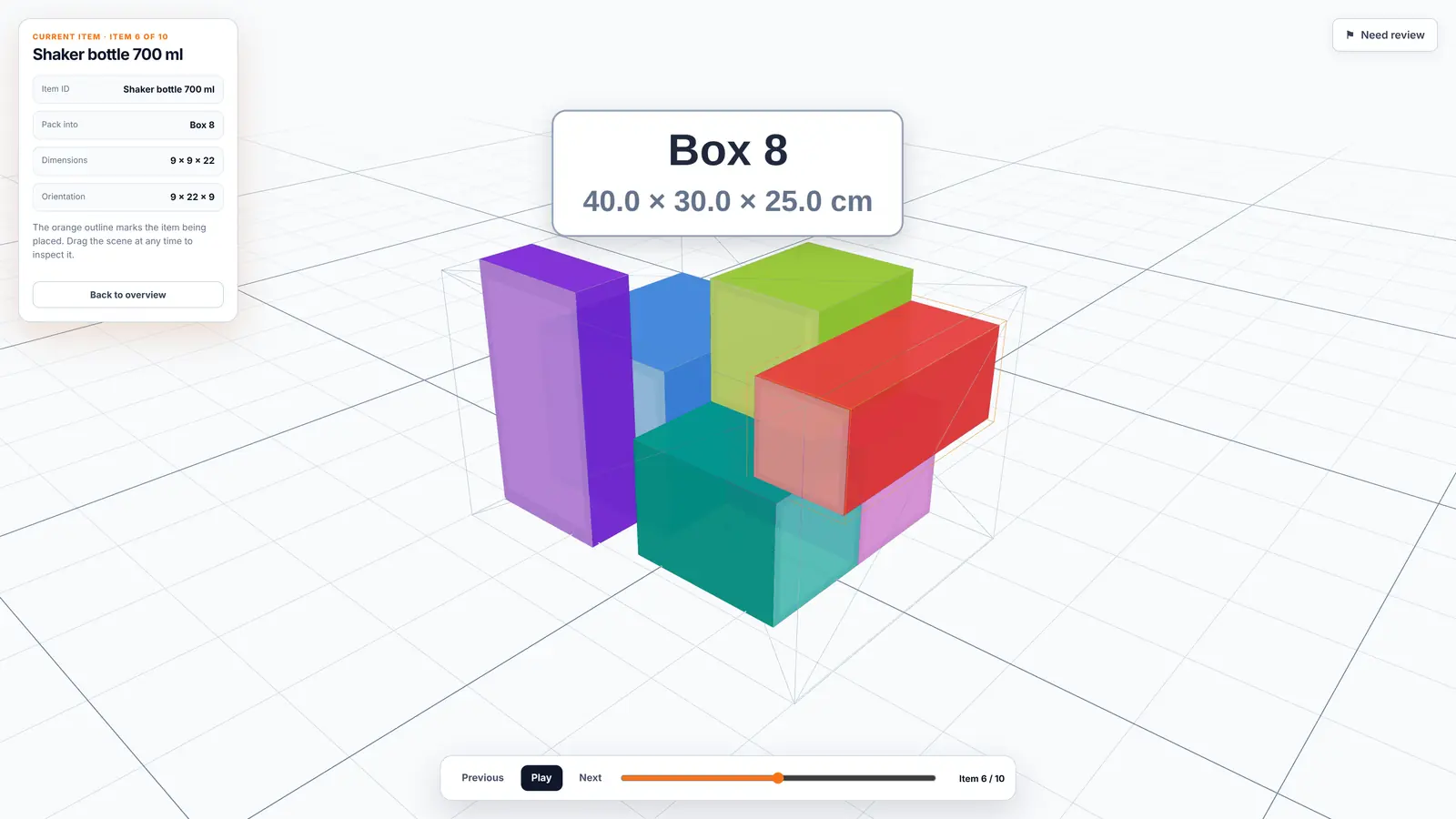
The TCS-i packer guide: step 6 of 10, showing which item goes next, which way up and where (demo order).
The TCS-i Cartonization Control Hub sits on top of your WMS. When an order is scanned, it works out, in under 200ms, the smallest box in your suite that fits and shows the packer a step-by-step 3D guide. Brands can set their own rules, such as fragility buffers or an exact packing note for a bundle, so the floor follows them without PDFs or email chains.
Multi-item orders are where this pays most: $1.60–$3.40 saved per multi-item order, for example moving a multi-item apparel order from Box 10 to Box 4B. Across all orders, including single items that often have no smaller box to go to, the average is about $0.35 per order, roughly $350 a day at 1,000 orders a day. Every warehouse has a different order mix, so the honest answer for your operation comes from your own data.
That is what our free Box Suite Optimizer is for. Upload your SKU master, order lines and current boxes, and it packs each distinct order in 3D with our engine. It then shows three levels of savings: packing with the boxes you already have, changing one or two sizes, and a whole new lineup. Your files are parsed in your browser, and only item dimensions, quantities and weights are sent to the engine.
The Bottom Line
- Clean your SKU dimensions first; every result depends on them.
- Compare each order with its tightest 3D fit, not with the box it happened to ship in.
- Split the waste into "wrong box picked" and "right box missing", because they have different fixes.
- Change the suite one size at a time, and stop when the next size no longer earns its shelf space.
Your box suite is a pricing table you wrote in cardboard. Audit it like one, then make sure the floor actually uses it. Wasted space is wasted capital.
Find the gaps in your box suite
Run your own orders through the free Box Suite Optimizer in a few minutes, or book a demo and we'll walk through your results and the floor enforcement that keeps them.